Use Additional LLM Credits to increase the monthly credit allowance on an active Base LLM API subscription. Each credit equals CHF 1 of inference capacity. Top-ups renew automatically each month unless you cancel the subscription.
Prerequisites
Before purchasing a top-up, make sure you have:
- An active Phoeniqs portal account with permission to make purchases
- An active Base LLM API subscription
- The Phoeniqs API Key for the Base LLM API you want to credit
If you do not have a Base LLM API subscription yet, purchase one first from Products in the Phoeniqs Console. See Subscription Plans for plan details.
Add a recurring top-up
1. Sign in to the Phoeniqs Console
Sign in at https://console.phoeniqs.com.
2. Purchase Additional LLM Credits
- Open Products from the left navigation (or click Add Subscription from the Dashboard).
- Find Additional LLM Credits in the Model Service category.
- Choose how many credits to add each month. Each credit costs CHF 1 (excl. VAT).
- Click Add to cart, then Proceed to Checkout.
- Complete checkout and confirm your order.
For general checkout steps, see Buy a Subscription.
3. Open Resource Groups
Navigate to Resource Groups in the left-hand menu and open your PHOENIQS Model Service resource group. Expand the Subscriptions list and find Additional LLM Credits with status Ordered.
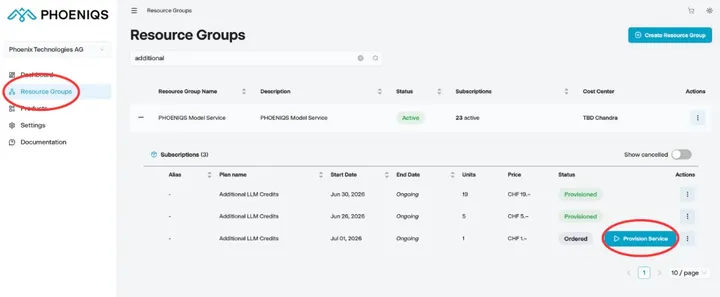
4. Provision the top-up
- Click Provision Service on the Additional LLM Credits row.
- In the Provision service pop up, select the LLM API you wish to add these credits to from the dropdown.
- Click Provision.
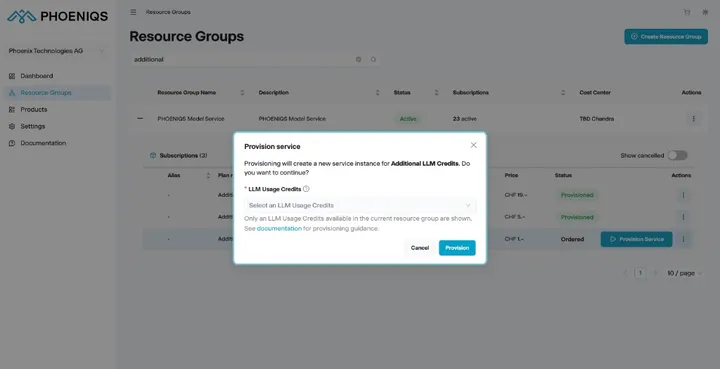
The additional credits are added to the selected Base LLM API subscription.
What happens next
- The top-up credits are available on your Base LLM API subscription for the current billing period.
- The Additional LLM Credits subscription renews automatically each month and adds the same number of credits again.
- Credits are deducted based on each model's input and output token pricing per 1M tokens.
- Credits are non-transferable and expire at the end of each billing period.
One-time top-up
If you only need extra credits for a single month:
- Purchase Additional LLM Credits and provision it against your Base LLM API key, as described above.
- Cancel the Additional LLM Credits subscription.
You can use the purchased credits for the remainder of that billing period. The top-up will not renew in the following month.