Memories are short notes about you that PHOENIQS Chat adds to every conversation: your role, your team, the language you want answers in, or how you like them formatted. You write them once instead of repeating them in every chat.
How memory works
- You write your memories yourself. You create, edit and delete them in the Memories panel. The model reads your memories but never saves one on its own, even if you ask it to remember something.
- Your memories are private. Other users and your administrators cannot read them.
- Your memories go into every conversation, whichever model or agent you chat with, including agents that colleagues have shared with you. Don't save passwords, personal data of others or anything you wouldn't give to every agent you use.
- You can stop using them at any time. Switching memory off keeps your memories saved but leaves them out of your conversations. See Switch memory off.
Open the Memories panel
Click Memories in the navigation bar on the left. The panel lists your memories and lets you filter them.
The Memories entry shows only with Expert Mode on. Expert Mode is on by default; the switch is at the bottom of the side panel. See Quick Start.
Create a memory
- In the Memories panel, click Create Memory.
- Under Key, enter a short name to find the memory again. Use lowercase letters and underscores only, for example
answer_language. - Under Value, write what Chat should know, for example "Answer in German, but keep English technical terms."
- Click Create.
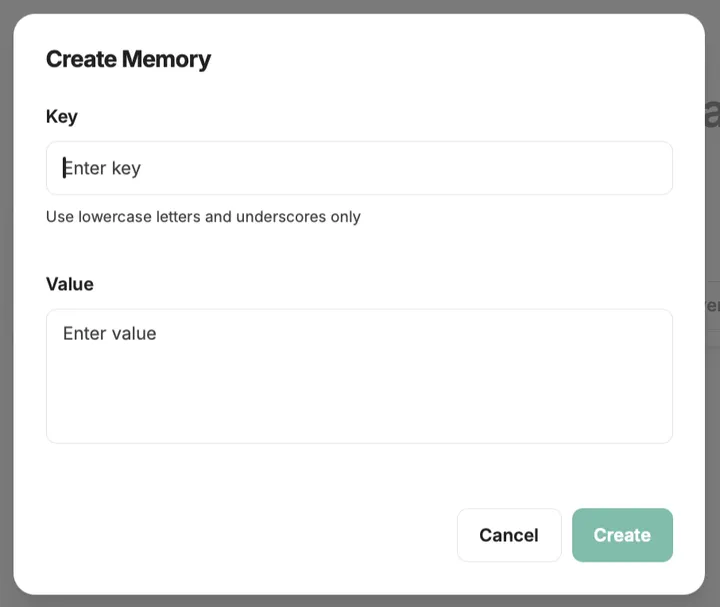
Create Memory
To change or remove a memory, open it in the Memories panel and choose Edit Memory or Delete Memory.
What makes a good memory
Keep each memory to one fact. Several short memories are easier to keep up to date than one long one.
Switch memory off
Use the Use memory switch at the top of the Memories panel. You can also go to Settings > Data & Privacy and switch off Reference saved memories.
With memory off, your memories stay saved but Chat leaves them out of your conversations. Switch it back on to use them again.
For administrators
Administrators decide what each role may do with memories. In the Memories panel, click Admin Settings, choose a role and set:
- Allow using Memories
- Allow creating Memories
- Allow updating Memories
- Allow reading Memories
- Allow users to opt out of Memories
To turn memory off for a role, clear Allow using Memories. Administrators cannot read the memories of other users.