
#
How to add LLM Credits
Use Additional LLM Credits to increase the monthly credit allowance on an active Base LLM API subscription. Each credit equals CHF 1 of inference capacity. Top-ups renew automatically each month unless you cancel the subscription.
#
Prerequisites
Before purchasing a top-up, make sure you have:
- An active Phoeniqs portal account with permission to make purchases
- An active Base LLM API subscription
- The Phoeniqs API Key for the Base LLM API you want to credit
Additional LLM Credits apply to one Base LLM API subscription. All API keys on that subscription share the same credit pool, including any credits you add through a top-up.
If you do not have a Base LLM API subscription yet, purchase one first from Products in the Phoeniqs Console. See Subscription Plans for plan details.
#
Add a recurring top-up
#
1. Sign in to the Phoeniqs Console
Sign in at https://console.phoeniqs.com.
#
2. Purchase Additional LLM Credits
- Open Products from the left navigation (or click Add Subscription from the Dashboard).
- Find Additional LLM Credits in the Model Service category.
- Choose how many credits to add each month. Each credit costs CHF 1 (excl. VAT).
- Click Add to cart, then Proceed to Checkout.
- Complete checkout and confirm your order.
For general checkout steps, see Buy a Subscription.
#
3. Open Resource Groups
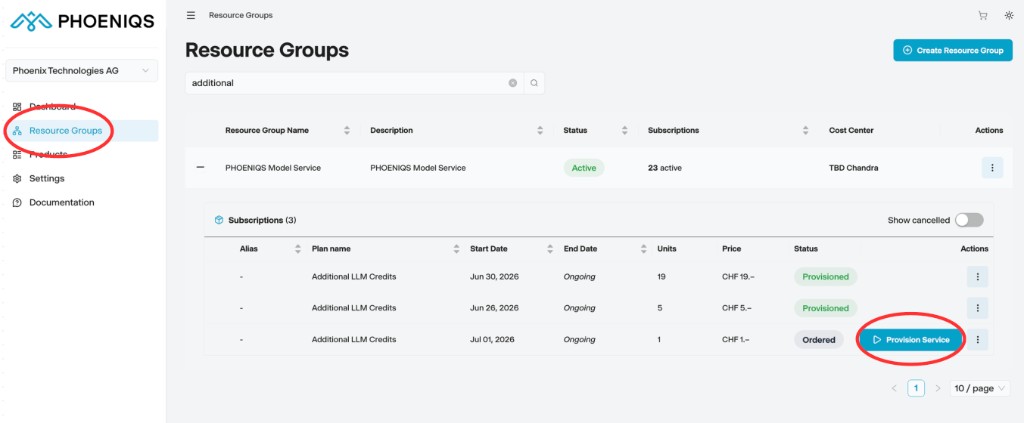
Navigate to Resource Groups in the left-hand menu and open your PHOENIQS Model Service resource group. Expand the Subscriptions list and find Additional LLM Credits with status Ordered.
#
4. Provision the top-up
- Click Provision Service on the Additional LLM Credits row.
- In the Provision service pop up, select the LLM API you wish to add these credits to from the dropdown.
- Click Provision.
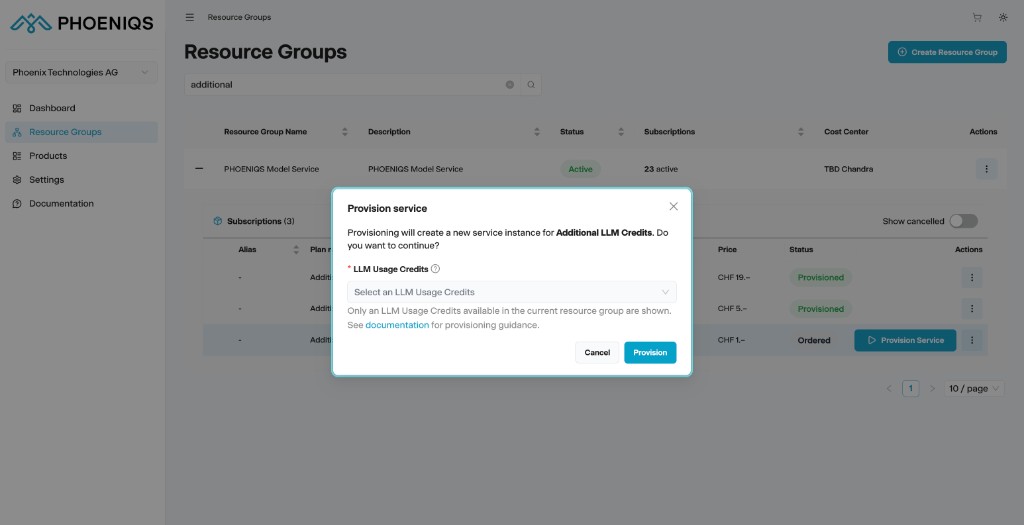
The additional credits are added to the selected Base LLM API subscription.
#
What happens next
- The top-up credits are available on your Base LLM API subscription for the current billing period.
- The Additional LLM Credits subscription renews automatically each month and adds the same number of credits again.
- Credits are deducted based on each model's input and output token pricing per 1M tokens.
- Credits are non-transferable and expire at the end of each billing period.
#
One-time top-up
If you only need extra credits for a single month:
- Purchase Additional LLM Credits and provision it against your Base LLM API key, as described above.
- Cancel the Additional LLM Credits subscription.
You can use the purchased credits for the remainder of that billing period. The top-up will not renew in the following month.
#
Notes
Good to know
- You must provision the top-up before the credits apply to your Base LLM API. Purchasing alone does not add credits until provisioning is complete.
- You can purchase multiple Additional LLM Credits subscriptions if you need to increase allowance further. Provision each one against the same Base LLM API key.
- Monitor usage against your combined credit allowance (Base LLM API credits plus any active top-ups).
tip Need help?
If you experience any issues or need assistance, please contact support.
#
See also